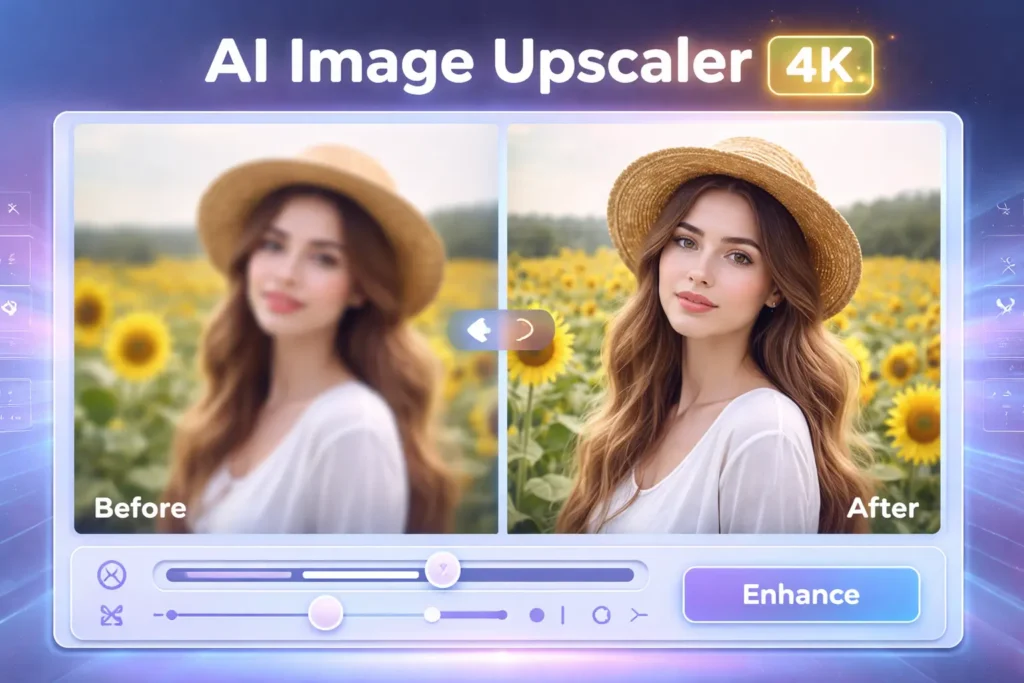
Have you ever tried to enlarge a photo only to end up with a blurry, pixelated mess? Traditional image resizing methods simply stretch existing pixels, creating poor-quality results that look unprofessional and unusable. This is where AI image upscaling revolutionizes the process.
Our free online AI upscaler uses advanced deep learning algorithms to enhance image quality and increase resolution intelligently. Whether you’re a photographer needing print-ready files, an e-commerce seller optimizing product photos, or an artist restoring old memories, our tool automatically upscales images to 2x, 4x, or even 8x their original size without losing quality. No software installation required—just upload, enhance, and download your high-resolution images in seconds.
What is AI Image Upscaler & How Does It Work?
AI image upscaling, also known as super-resolution, uses neural networks and deep learning to intelligently add pixels to an image. Unlike traditional methods that simply duplicate or interpolate existing pixels, AI upscaling analyzes patterns in your image—textures, edges, colors, and details—and generates new pixels that match the original content’s characteristics.
The AI has been trained on millions of high-resolution images, learning how real-world details appear at different scales. When you upscale a photo, the algorithm reconstructs fine details, sharpens edges, removes blur, and reduces noise, resulting in a crisp, professional-quality image that maintains the integrity of the original.
AI Upscaling vs. Traditional Methods: A Clear Comparison
Understanding the difference between AI upscaling and traditional resizing methods is crucial for achieving professional results:
| Method | Traditional (Bicubic) | AI Upscaling |
| Portraits | Blurry skin, loss of facial details, unnatural smoothing | Sharp features, natural skin texture, enhanced eyes and hair details |
| Text/Graphics | Fuzzy edges, illegible small text, jagged lines | Crisp edges, legible text, smooth lines and curves |
| Artwork/Anime | Color bleeding, loss of sharp lines, muddy details | Preserved sharp lines, vibrant colors, enhanced fine details |
| Processing | Instant, simple pixel interpolation | AI analysis and reconstruction, typically under 30 seconds |
The difference is dramatic. AI upscaling produces images suitable for professional portfolios, commercial printing, and high-quality displays, while traditional methods leave you with unusable, pixelated results.
Who Uses Our AI Upscaler? Key Applications
Our AI image upscaler serves diverse professionals and enthusiasts across multiple industries:
For Photographers & Designers
Professional photographers and graphic designers use our tool to prepare images for large-format printing, create print-ready portfolios, and recover details from older digital photos shot at lower resolutions. When clients request billboard-sized prints or high-DPI marketing materials, AI upscaling transforms standard resolution images into professional-quality, sharp outputs at 4K resolution and beyond. The tool excels at enhancing portraits, preserving skin texture, and sharpening fine details like eyes and hair that make the difference between amateur and professional work.
For E-Commerce & Real Estate
Online sellers and real estate agents know that image quality directly impacts sales. Product photos shot on smartphones or sourced from manufacturers often lack the resolution needed for zoom features and high-quality listing pages. Our AI upscaler enhances product image quality, making textures, fabrics, and details crystal clear. Real estate professionals use it to upscale property photos for premium listings, virtual tours, and large print brochures, ensuring every room and architectural detail looks its absolute best.
For Artists & Anime Enthusiasts
Digital artists and anime fans face unique challenges when upscaling illustrations and artwork. Our AI models are specifically trained to handle sharp lines, vibrant colors, and the distinct characteristics of drawn content. Whether you’re preparing artwork for print sales, creating high-resolution versions of favorite anime scenes for personal collections, or upscaling digital paintings for gallery display, our tool preserves the artistic intent while adding incredible detail and clarity.
For Archivists & Personal Use
Family photos, historical documents, and vintage images deserve preservation at the highest quality. Our AI upscaler breathes new life into old photos, restoring details that seemed lost forever. Scan old prints at standard resolution, then use our tool to enhance them to modern HD or 4K standards suitable for digital archiving, large prints for family gatherings, or sharing on social media. The AI removes grain and noise while recovering facial features and environmental details, making precious memories look better than ever.
How to Upscale Your Image in 3 Simple Steps
Getting started with our AI upscaler is remarkably simple. No software installation, no technical knowledge required—just three straightforward steps:
- Upload Your Image: Drag and drop your photo directly into the upload area, or click to browse your files. We support all major image formats including JPG, PNG, WebP, and HEIC. For efficiency, you can use our batch upload feature to process multiple images simultaneously—perfect for photographers handling entire shoots or e-commerce sellers updating product catalogs.
- Choose Your Settings: Select your desired upscale factor: 2x for moderate enhancement, 4x for high-resolution outputs (perfect for 1080p to 4K conversion), or 8x for maximum detail. You can also enable additional options like denoise to remove grain from older photos, or select specialized AI models optimized for portraits, landscapes, or artwork.
- Download & Use: Within seconds, your high-resolution image is ready. Download it directly to your device with no watermarks. All upscaled images are available for commercial use—use them in client projects, products, marketing materials, or anywhere you need professional-quality visuals. Our fast processing means you can upscale dozens of images during a coffee break.
The entire process typically takes less than 30 seconds per image, even at maximum resolution settings. No complex software to learn, no subscriptions to manage—just clean, professional results every time.
Why Choose Our AI Upscaler? Feature Breakdown
We’ve built our AI upscaler to address every limitation we found in competitor tools, delivering features that professionals actually need:
- Advanced Batch Processing: Unlike single-image tools that force you to upload photos one at a time, our batch processing feature handles entire folders simultaneously. Upload 50 product photos, wedding shots, or property images at once and let the AI work on all of them. This saves hours of repetitive work and makes professional workflows actually efficient.
- Multiple Specialized AI Models: Different types of images require different approaches. We offer distinct AI models trained specifically for photographs, artwork and illustrations, anime and manga, and text-heavy images. Each model understands the unique characteristics of its content type—portraits get natural skin texture, anime gets sharp lines and vibrant colors, and text gets crisp, legible edges.
- Video Upscaling Capability: Most online tools stop at static images. Our platform also supports video upscaling, letting you enhance footage from 1080p to 4K resolution. Perfect for content creators, filmmakers working with archival footage, or anyone wanting to improve video quality for modern displays.
- API Integration for Developers: Businesses and developers can integrate our upscaling technology directly into their workflows using our comprehensive API. Automate image enhancement for e-commerce platforms, content management systems, or custom applications. Our API includes batch processing endpoints, webhook support, and detailed documentation for seamless integration.
- Privacy-First Approach: Your images are yours alone. We use industry-standard encryption during upload and processing, and all uploaded images are automatically deleted from our servers within 24 hours. No one accesses your photos, and we never use your images for AI training or any other purpose.
- Transparent Pricing & Free Tier: Our free tier includes generous monthly upscaling credits with no watermarks—plenty for personal use and small projects. For professionals, our paid plans offer unlimited processing, priority rendering, and access to premium AI models. Unlike competitors with hidden restrictions, our pricing is completely transparent with no surprise limitations.
- Cross-Platform Accessibility: Access our tool from any device—desktop computers, tablets, or smartphones. The web interface works seamlessly across all modern browsers, and we also offer a dedicated desktop application for offline processing when you need it. Whether you’re working from your studio or editing on location, your AI upscaling toolkit travels with you.
FAQs
Can you upscale an image without losing quality?
Yes, absolutely. AI upscaling specifically addresses the quality loss problem that plagues traditional resizing methods. While conventional techniques simply stretch existing pixels (causing blur and pixelation), our neural networks analyze your image’s content and intelligently generate new pixels that match the original’s patterns and details. The result is a lossless upscale that actually enhances sharpness, reduces noise, and preserves or even improves the perceived quality of your image.
Is AI upscaling better than Photoshop’s resize?
For most use cases, yes. Photoshop’s resize functions (even Preserve Details 2.0) use interpolation algorithms that, while sophisticated, still work by averaging and duplicating pixels. AI upscaling uses deep learning trained on millions of high-resolution images, enabling it to genuinely reconstruct details rather than just interpolating them. The difference is especially noticeable in faces, text, and complex textures. However, Photoshop remains superior for very precise, manual editing workflows where you need complete control over every aspect.
What’s the best image format for upscaling (JPG vs PNG vs WebP)?
PNG is generally best for upscaling because it’s lossless and preserves all original image data without compression artifacts. JPG uses lossy compression that can introduce subtle noise and artifacts, which may be amplified during upscaling. However, our AI models are specifically trained to handle JPG compression artifacts, so you’ll still get excellent results. WebP offers a good middle ground with better compression than PNG and less quality loss than JPG. For the absolute best results, use PNG or the highest quality JPG you have available.
Can I upscale videos as well?
Yes! Our platform supports video upscaling using the same advanced AI technology we apply to images. You can enhance videos from 720p to 1080p, 1080p to 4K, or even lower resolutions to HD quality. Video processing takes longer than still images due to the frame-by-frame enhancement required, but the results are worth it—perfect for archival footage restoration, content creation, or preparing videos for modern high-resolution displays.
Is the upscaled image free for commercial use?
Absolutely. All images processed through our platform are cleared for commercial use with no restrictions or attribution required. Use them in client projects, sell them as prints, include them in products, or deploy them in marketing campaigns—the enhanced images are yours to use however you need. We never claim any rights to your content.
Do you have a desktop app or only online tool?
We offer both! Our primary platform is the web-based online tool, accessible from any device with a browser—no installation required. For users who prefer offline processing or need to work without internet connectivity, we also provide a desktop application for Windows, macOS, and Linux. The desktop app includes all the same AI models and features as the online version, with the added benefit of local processing for enhanced privacy and the ability to work with large batches without upload constraints.
Whether you’re a photographer preparing a portfolio, an e-commerce seller optimizing product listings, or simply someone who wants to restore cherished family photos, AI image upscaling delivers professional-quality results that were impossible just a few years ago. Our free online tool combines cutting-edge deep learning technology with a user-friendly interface that anyone can master in minutes. Upload your first image today and experience the difference that intelligent, AI-powered enhancement makes—transform blurry, low-resolution photos into sharp, print-ready masterpieces with just a few clicks.

Adrian Cole is a technology researcher and AI content specialist with more than seven years of experience studying automation, machine learning models, and digital innovation. He has worked with multiple tech startups as a consultant, helping them adopt smarter tools and build data-driven systems. Adrian writes simple, clear, and practical explanations of complex tech topics so readers can easily understand the future of AI.